preload
Dec 10

Amazing Mac SD Memory Card Data Recovery

Leading Mac Data Recovery software for SD Memory Card


Normally: $89.99

ZOT Price: $24.99

Click to macZOT! Download Trial


Recover from SD/Memory Card, USB/Local Drive and Mobile Phone.


It recover data from nearly all cards: Compact Flash, Memory Stick Duo, Memory Stick Pro, Memory Stick Pro Duo, SD Card, mini-SD, micro-SD, Multimedia Card MMC, Smart Media, xD Picture Card, USB drive, flash drive that made by different manufacturers: SanDisk, Kingston, KingMax, Sony, Lexar, PNY, PQI, Toshiba, Panasonic, FujiFilm, Samsung, Canon, Qmemory, Transcend, Apacer, PRETEC, HITACHI, Olympus, SimpleTech, Viking, OCZ Flash Media, ATP, Delkin Devices, A-Data.


Apply to All Card Recovery Scenarios

  • Photos deleted accidentally or intentionally from memory cards
  • Photo loss due to formatting or "Delete All" operation
  • Memory card error or damage, or inaccessible memory card
  • Corruption due to the card being pulled out while your camera is on
  • Damage due to turning your camera off during a write/read process
  • Data corruption due to critical areas damage e.g. FAT/ROOT/BOOT area damage
  • Data loss due to using between different cameras/computers/devices
  • Other events that could cause damage to data in card


System Requirements:

MacOS 10.12 (Sierra), Mac OS X 10.11 (El Capitan), 10.10 (Yosemite), 10.9 (Mavericks), 10.8 (Mountain Lion), 10.7 (Lion), 10.6 (Snow Leopard).

Dec 06

M4P to MP3 Converter for Mac

Uncategorized Comments Off

M4P to MP3 Converter for Mac

Easily convert DRM-encrypted M4P songs, Apple Music to MP3, AAC, M4A, FLAC, M4R flawlessly with original quality kept.


Normally: $39.95

ZOT Price: $24.95

Click to macZOT! Download Trial


Trusted by more than 40 million people!


M4P to MP3 Converter for Mac is specially designed for iTunes users to unlock DRM protected iTunes music and converts Apple Music and audiobooks to plain MP3 so you can play them on  on any devices without restrictions.


Discover more M4P Converter for Mac features:

  • Remove DRM Protection – disable DRM from protected iTunes music/audiobook on Mac
  • Convert any playable audios on iTunes with advanced options
  • Convert any iTunes audios from M4P to MP3, M4A, AC3, M4R formats with fast speed
  • Extract audio from iTunes videos files on Mac and save them in MP3.
  • Keep ID Tags and metadata information in output MP3, M4A files
  • Preview iTunes library on playlist menu
  • Fast converting speed – convert audio files at up to 16x speed on Mac.
  • The ID3 Tags information will be persevered in converted MP3 and M4A files
  • It lets you edit title, artist, album, genre and other ID3 tags info manually
  • Save all your recorded music in specific order by changing the output file name.
  • Set your favorite photo as the profile image of your playlist.
  • After the M4A conversion, the Chapter in audiobooks will be remained in output files
  • Support Mac OS 10.6 – 10.12 (macOS Sierra)


What our customers are saying:


"I recently purchased M4P Converter for Mac. I wanted to let you all know what an excellent product you have there! I have been burned before with other software but M4P Converter for Mac does everything advertised. Thank you for such an excellent product! " —– Brittany Mumford


"Excellent app for converting Apple music. The best one I've found in terms of ease of use / features. I've been using M4P Converter for Mac for a month already and I'm very happy with it. :)"

—–  George Snyder


"This is what I'm looking for! Happy to convert my Apple music for play on an Android Smartphone! " —— Steve


"Thanks for the fantastic music converter! I have a number of M4Ps that I needed to convert to MP3s and this is doing it perfectly…thanks again!"  ——  Jeff Loch


"I can play music without copyright protection, thanks to this tool which can wipe off the DRM. I also found there are many other useful functions with this software, strongly recommended! "—— Steve Spalding


"This software is the best I have ever found. I thought it was going to be a big problem finding a M4P converter but I am glad I found this Mac M4P converter". —– Paul Lapidus


"Thank you very much. Your response was quick and solved my problem. I am now able to use the software again. I will continue to recommend this program to my friends in the future as I have done in the past. I will be sure to let them know that the customer service is also excellent. Thanks again!"——-  David Sansome
 

Ready to try it out? Start a Free Trial Now


System Requirements:

Mac OS X 10.6 and later; iTunes 10. or later

Nov 30

Photo Size Optimizer

Uncategorized Comments Off

Photo Size Optimizer

Powerful photo resizer and optimizer


Normally: $19.99

ZOT Price: $9.99

Click to macZOT! Download Trial


Photo Size Optimizer for Mac

Photo Size Optimizer for Mac, a powerful photo re-sizer and optimizer for Mac OS X, will optimize all your photos by 80% ~ 20% comparing to their originals while keeping their original resolution, quality and png, jpg, gif formats. With Photo Size Optimizer for Mac, you can save huge space and share full-resolution photos with your friends much faster.


Features of Photo Size Optimizer for Mac:

- One-click photo size optimization on Mac OS X.
- Easy management: When a folder dragged into the application, Photo Size Optimizer for Mac will work on it immediately.
- Support 70 types of image formats:
JPG, BMP, PNG, GIF, PDF, PSD, PNT, RGB, ARW, BMPF, CUR, CRW, CR2, DCR
- Photo sharing becomes more easier.
- More choices:
- Lossless mode (png, jpg, gif);
- Lossy mode (jpg);


System Requirements:

Mac OS X 10.6 +, iMac, Macbook Mini, Macbook air, Mountain lion, Macbook Pro, Yosemite, mavericks, EI Capitan, macOS Sierra.

Nov 25

Tropic Software-Black Friday Bundle!

Uncategorized Comments Off

Tropic Software-Black Friday Bundle!

Get them all for only $30!


Normally: $72.80

ZOT Price: $30.00

Click to macZOT!


Tropical Software

2Remember $9.95

iAddressX $19.95

KitchenTimer $2.95

TopXNotes $39.95

_____________________

Total Retail Price: $72.80

Special MacZot Price: $30

~~~~~~~~~~~~~~~~~~~~~~~~~~~~~~~~~~~~~~~~~~~~~~~~~~

2Remember

Easy to use Mac reminder app. Takes up a tiny space on your screen but has numerous options for ToDos including flashing icon on dock, flashing tab red, alert and sound.

Hides just off-screen as soon as any other app opens, but un-hides when mouse moves over tab.

~~~~~~~~~~~~~~~~~~~~~~~~~~~~~~~~~~~~~~~~~~~~~~~~~~

iAddressX

Navigate

Navigate contacts from a small icon in the system menu, print Dymo labels, Dial regular and Skype calls, and more.


Navigate


Dymo Support

Print to your Dymo Label printer right from iAddressX.
Dial

Dial

Dial using an old-fashioned land line via modem, Bluetooth or USB Modem, or Skype.

Search

Search

Search your Contacts directly from the menu bar with iAddressX.


Search
 

Skype Support

Full support to initiate a call or chat using Skype.


Skype


~~~~~~~~~~~~~~~~~~~~~~~~~~~~~~~~~~~~~~~~~~~~~~~~~~

KitchenTimer – Your Kitchen Pal!

We wrote KitchenTimer to remind us when it was time to get up and away from our computer to check what was in the oven. (OK – we confess. We let it burn too many times, so we had to do something.)

Here are some of the ways KitchenTimer can help you be more productive:
Set a timer so you don't forget something in the kitchen (water boiling, a roast, those yummy cookies)
Need a break? Of course you do. Set a timer so you don't forget.
Have an important phone call coming up? Set KitchenTimer to remind you.
Time to pick up the kids at school? Set a reminder.

~~~~~~~~~~~~~~~~~~~~~~~~~~~~~~~~~~~~~~~~~~~~~~~~~~

Seven Reasons TopXNotes beats Apple Notes

For every release TopXNotes has been unmatched in comparison with Apple Notes. Here are 7 reasons why TopXNotes still beats Apple Notes as an organizing tool.


1. Mac OS

The first reason to choose TopXNotes is that the newest Apple features are only available on the latest release of Apple Notes running only on El Capitan. A table showing the versions of Apple Notes available for each Mac OS version follows:

In addition to not being able to use the same version of Apple Notes on each OS release, the following features of TopXNotes are not available in Apple Notes:


Organize

2. NoteOrganizer Categories

Organize your notes using powerful TopXNotes features, including our NoteOrganizer, Groups and Categories features. Then use the NoteOrganizer indexing features to quickly find your way around. Identify every note with a category that you create by selecting a name, color and icon. Apple Notes has no such invormation organizing system.


View and MultiView

3. View and MultiView

View one, two, or as many notes as you like with TopXNotes unique MultiView system. Apple Notes has no multiple note display and editing system.


View and MultiView4. MultiView Toolbar

A sliding text/format toolbar that is always where you are typing. Apple Notes       

has no text tools that slide into place when and where needed.


Access


5. QuickNotes menu-Instant access from the desktop!

QuickNotes is an "always on top" window with a menu containing your "Top 10 Notes" always available for rapid easy access. Apple Notes has no facility for quick note access.


Encrption6. Dual-Level Encryption                    

Our dual-level encryption provides just the right balance between usability

and security to keep prying eyes at bay. Apple Notes does not have 

dual-level encryption.


Mobile7. Cloud-Free WiFi Safe Sync

TopXNotes stores NOTHING in the iCloud! Notes from TopXNotes on your Mac can be syced to your ipad, iPhone or iPod Touch on your own safe, secure, encrypted home or small business WiFi network. Apple Notes does not support local WiFi Safe Sync. And there's one more thing…


8. Free Samples and TemplatesSafe Sync

TopXNotes ships with over 100 Samples and Templates to get you started getting

organized. Apple Notes does not.     


Tropical Software is your choice for Mac productivity apps! Tropical Software, Inc. was founded by James Lee in 2004. In 2005 we introduced our flagship product, TopXNotes, a powerful personal note organizer that emphasizes our dedication to providing easy to learn and use Mac productivity tools. In 2006 we were the first to add the ability to export notes to iPod. TopXNotes went on to become one of the most popular note products for Mac (by download count) and our presentations to Mac User Groups across America have been very popular. In 2010 we had a major user interface update to TopXNotes and added TopXNotes touch for Apple touch devices and NoteSync to sync between Mac and devices. In 2011 TopXNotes, 2Remember and Kitchen Timer for Mac all were released into the Apple Mac App store.  We hope you will enjoy them.


Nov 22

USB Network Gate for Mac OS at 50% OFF

Uncategorized Comments Off

USB Network Gate for Mac OS at 50% OFF

Access remote USB devices over Network


Normally: $89.95

ZOT Price: $45.00

Click to macZOT! Download Trial


USB over Network for Mac lets your computer work with remote USB devices over Internet/LAN/WAN as if those devices were connected directly to this computer. You can share a USB device with remote computers no matter how far they are and let people all over the world use them easily.


By intercepting USB port activity of a shared USB device and redirecting it via TCP/IP network USB over Network for Mac lets you access your printer, scanner, web-cam, USB dongle or any other supported USB device from your home computer or office laptop anywhere any time! Just plug the device in and it will automatically appear on the remote side of the connection.


System Requirements:

Mac OS X 10.9-10.12

Nov 19

iFotosoft Photo FilmSim

Rediscover the magic of stunning analog film effects and film grain.


Normally: $39.99

ZOT Price: $19.99

Click to macZOT! Download Trial


In order to achieve the magic of analog film, iFotosoft FilmSim provides gorgeous film presets and camera profiles to produce stunning results. Just import photos to apply legendary analog film rendering for Kodak, Fuji and Ilford camera profiles. It always provides some unique styles to your photos with the advanced calibration technology.

filmsim initial


iFotosoft FilmSim is a film pack with four analog film profile solutions with dozens of revolutionary camera profiles. The different contrast, saturation and special of analog film color mode bring out numerous of stunning photos effects. You can also choose between Black & White, Ferric Sulfate, Gold, Selenium and Sepia.

It is not only an excellent color-rendering program, but also reproduce the authenticity and natural look of film with analog film grain. The effects are able to custom grain, dust and scratches that enhance the feeling of the traditional photograph. The film pack works with JPEG, TIFF and most of the RAW formats. And the super easy to use interface just make sure you can design stunning photos with analog film as your imagination.


Just share photos with analog film effects to Facebook and other social media within one click. Syncing output with AirDrop and Photos to other devices directly from the program. And sending photos to friends via Email is also supported.


Key Features:

·      Advanced calibration technology with legendary analog film effects.

·      Analog film color rendering for Kodak, Fuji and Ilford film camera profiles with desired results.

·      Reproduce the authenticity and natural look of film with analog film grain

·      The different contrast, saturation and special of analog film color mode bring out numerous of stunning photos effects.

·      Custom grain, dust and scratches that enhance the feeling of the traditional photograph.

·      The program works with JPEG, TIFF and most of the RAW formats.

·      Super easy to use interface just make sure you can design stunning photos with analog film as your imagination.

·      Share photos with analog film effects to Facebook and other social media within one click.

·      Sync output with AirDrop and Photos to other devices directly from the program.

·      Send photos to friends via Email within the program.


The filmpack including the following camera profiles:

Kodak Ektachrome 100VS

Kodak Ektachrome 25

Kodak Ektachrome 64

Kodak Ektachrome 200

Fuji Astia 100F

Fuji Provia 100F

Fuji Velvia 50

Generic Fuji Astia 100VS

Generic Kodak Ektachrome 100VS

Generic Kodak Ektachrome 64

Generic Fuji Provia 100F

Generic Fuji Velvia 100

Kodak Portra 160NC

Kodak Portra 160VC

Fuji Superia Reala 100

Fuji Superia X-tra 800

Fuji Superia HG 1600

Kodak BW 400CN

Kodak Tri-X 400

Kodak T-Max 3200

Fuji Neopan Acros 100

Ilford Pan F Plus 50

Ilford XP2

Ilford Delta 400

Ilford HP5 Plus 400

Ilford HPS 800

Kodak Elite 100

Fuji Superia 200


System Requirements:

Operation Systems: Macintosh OS 10.7 or above, including the latest version of OS X 10.12. CPU: 100 MB free hard drive space required for program installation. Memory: 512 MB DDR RAM or above

Nov 16

Stellar Phoenix Mac Data Recovery

Uncategorized Comments Off

Stellar Phoenix Mac Data Recovery

Recover Lost Data Efficiently on Mac


Normally: $99.00

ZOT Price: $49.50

Click to macZOT! Download Trial


Stellar Phoenix Mac Data Recovery program performs safe and accurate recovery of lost documents, photos, music files, or videos that have been accidentally or intentionally deleted from HFS, HFS+, FAT, ExFAT and NTFS format based file systems.

Key Benefits

  • Capable of reclaiming lost files on iMac, MacBook Pro, Air, Mac Mini, and Mac Pro
  • Facilitates RAW recovery on lost Mac volumes and data recovery from Encrypted file systems
  • Achieves complete data recovery on Mac OS X after logical disk errors
  • Smooth Mac recovery from unmounted OS X volumes
  • Supports Time Machine backup hard drive recovery
  • Compatible with the macOS Sierra 10.12
Mac Data Recovery
Stellar Phoenix Mac Data Recovery is a professional software that offers a wide variety of helpful features to let you pull your data back from the inaccessible volume.
Redeem Permanently Deleted Data
Mac data recovery software is backed by competent algorithms that can successfully attain restoration of permanently deleted data. On a Mac, deleted data is stored within the ‘Trash’ until it is permanently purged from the system.
Restore Deleted Volumes
Can’t spot existing volumes on your Mac? Use Stellar Phoenix Mac Data Recovery to restore them in no time. This powerful application helps locate and rebuild corrupted / damaged / deleted volumes on any HFS, HFS+, FAT, NTFS, or ExFAT formatted drive.
Lost Media Recovery
Threats and disasters like drive formatting, accidental deletion, virus / malware attack, etc. constantly pose a danger to your precious data.
External Hard Drive Recovery
Mac data recovery was never so versatile! Stellar Phoenix Mac Data Recovery software works transparently to the underlying hard drive structure and makes it possible to reclaim lost data from any HFS, HFS+, NTFS, FAT or EXFAT formatted hard disk drive.
RAW Recovery
If your Mac’s volumes have been severely damaged or corrupted, or you’ve not obtained satisfactory results through Data Recovery and Deleted Recovery options, you can choose to initiate RAW Recovery.
Encrypted Disk Recovery
If you have a password protected hard drive that has been damaged / corrupted / file deleted, don’t think you’ve lost the data on it forever. Recovering data from encrypted hard disks is super easy for this brilliant application.

                                  Stellar Phoenix Mac Data Recovery Awards:


Top TenPCMAGPC AdvisorPC QUEST  WatchStellar Phoenix Mac Data Recovery video:


System Requirements:

Processor: Pentium Class, Operating System: Mac OS X 10.11/10.10/10.9/10.8/10.7, Memory: Minimum 2 GB, Hard Disk: 50 MB of Free Space, Version: 7.0, Languages : English

Oct 22

100 Lens Flare Effects

Uncategorized Comments Off

100 Lens Flare Effects

The easiest way to apply lighting effects without Photoshop brushes – Only $14.99


Normally: $133.50

ZOT Price: $14.99

Click to macZOT!


The lens flares pack is here! The easiest way to apply lighting effects without Photoshop brushes is now available at InkyDeals and it’s incredibly easy to use.


Simply place the flare over the image, set its Blending mode to Screen and it’s done. That’s it. Easy peasy, lemon squeezy! The lens flares pack comes in two distinct formats: .Ai, for Adobe Illustrator, and .PNG-24 format for Adobe Photoshop and others.


What does that mean for me?


The vector files provide infinitely scalable flares, which you can simply place over your images. That’s it. No fancy schmancy, just immediate, high quality results.


The .PNG-24 file is basically a .JPG file that also contains transparency, and will work with both Photoshop and Illustrator. Even if you’re using Gimp, or another app that can manipulate images similarly to Photoshop, it will work.


Just take a look at what we’ve achieved with them! Color us impressed! And make sure to grab this awesome pack now, because only for a limited time you can get it for only $14.99!

Take a look at what you get:

preview-big-700px


System Requirements: Files are delivered as an instant download after completing your purchase. File types: PNG & AI. Reselling, sharing, redistributing and giving away is NOT permitted.

Oct 21

FireWall Builder

Uncategorized Comments Off

FireWall Builder

Easily build firewall configurations and policies on your Mac.


Normally: $59.95

ZOT Price: $19.95

Click to macZOT!


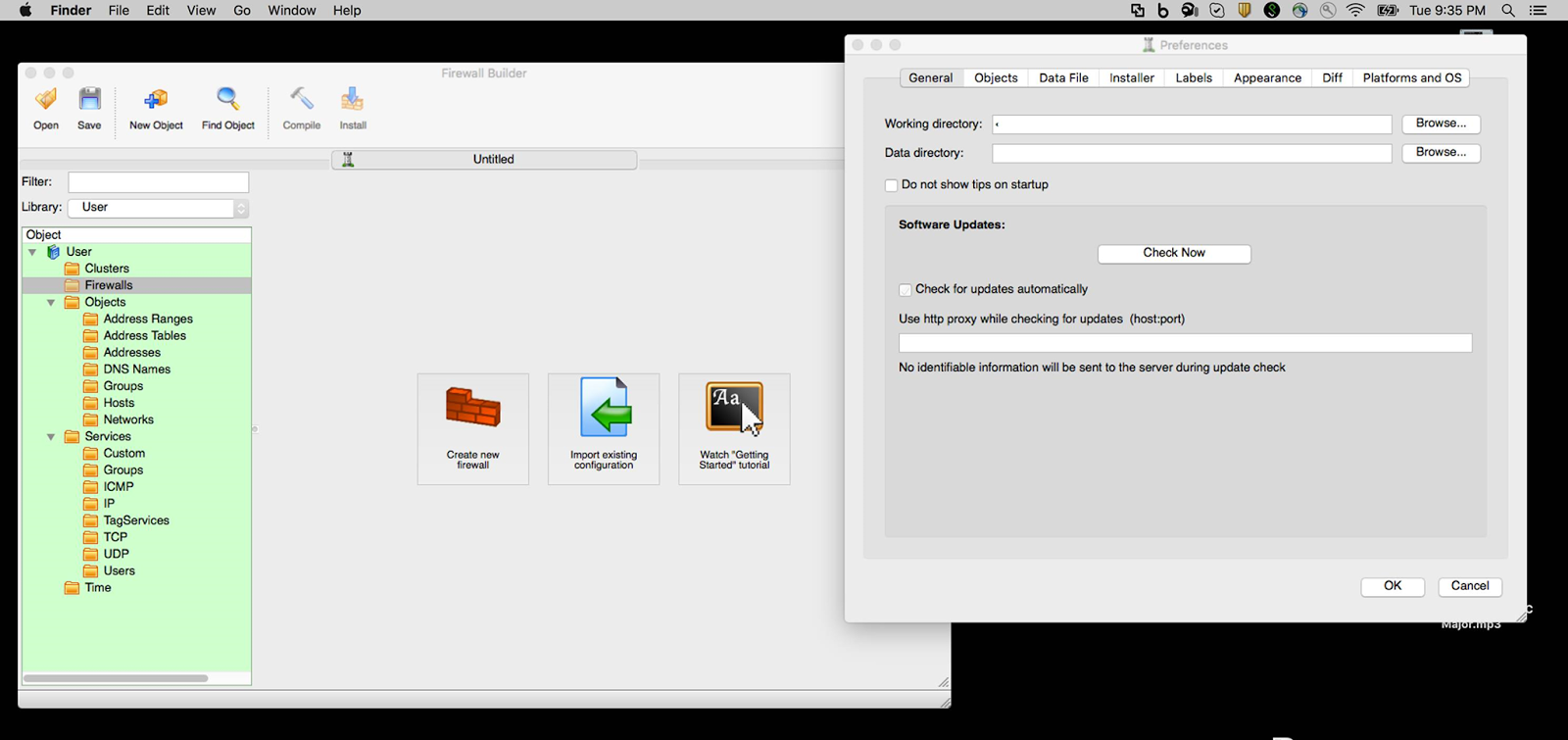
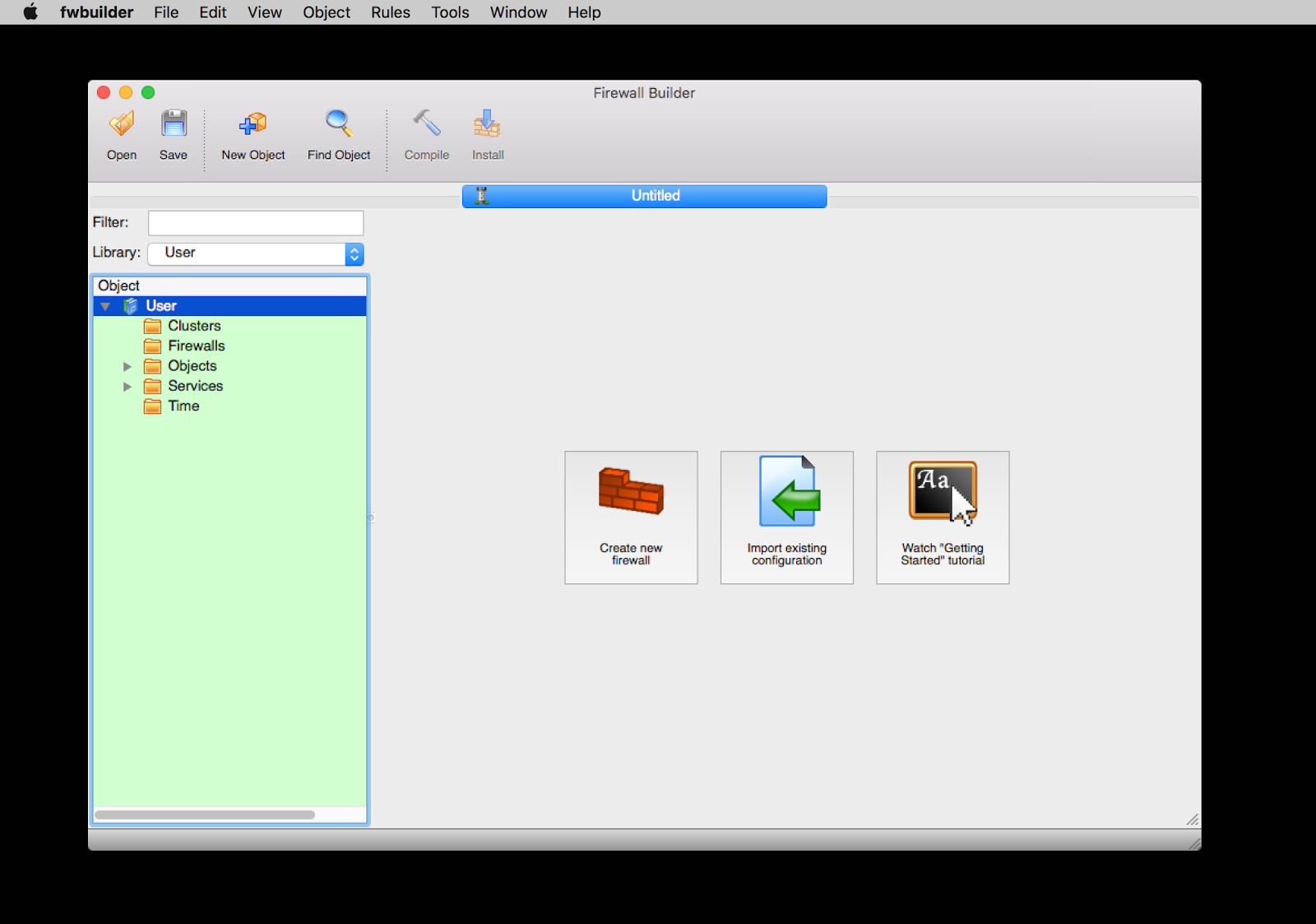
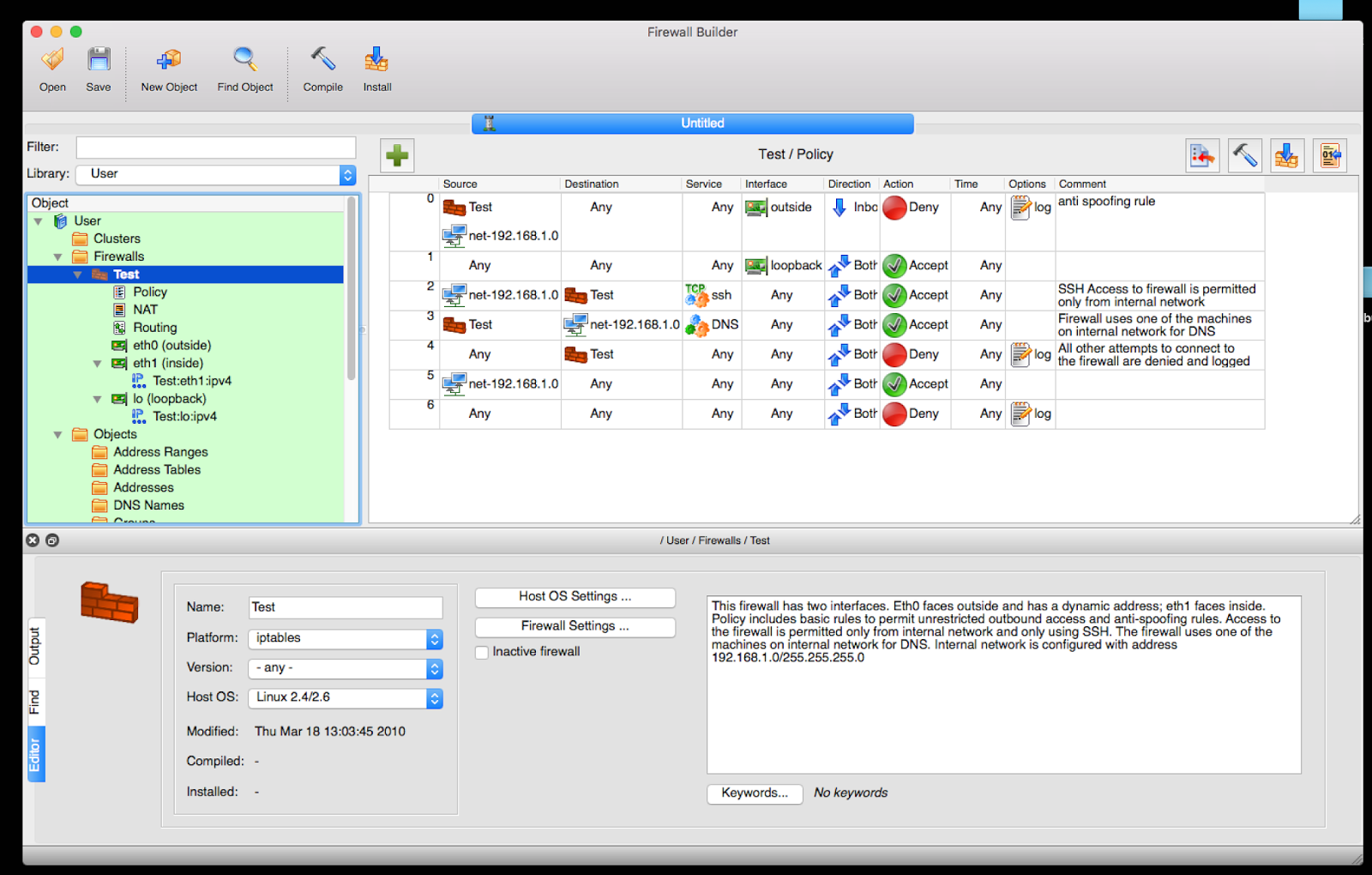
Firewall Builder : Is a flexible and powerful tool that allows you to build firewall configurations and policies for multiple firewalls/machines based on iptables, ipfilter, OpenBSD pf, Cisco ASA & PIX, or Cisco FWSM. fwbuilder uses objects and functionality like drag-and-drop and search-and-replace to help ease configurations. You can install the fwbuilder on a separate machine and then either manually transfer the configurations or securely deploy via SSH or SCP.


Firewall Builder consists of an object-oriented GUI and a set of policy compilers for various firewall platforms. In Firewall Builder, a firewall policy is a set of rules, and each rule consists of abstract objects which represent real network objects and services (hosts, routers, firewalls, networks, protocols). Firewall Builder helps the user maintain a database of objects and allows policy editing using simple drag-and-drop operations.


System Requirements:

Intel, 64-bit processor OS X 10.11 or later

Oct 17

Tenorshare iCareFone for Mac 3.2.0.0

NO.1 iOS System Optimization Tool for iPhone, iPad and iPod


Normally: $39.95

ZOT Price: $19.99

Click to macZOT! Download Trial


Tenorshare iCareFone for Mac is a 6-in-1 iOS system optimization tool. It fixed the iOS 10 update which was stuck in the White Apple logo mode, repairs iOS system, deletes unwanted files, optimizes your ongoing performance, blocks annoying ads, etc. The most important one is it can create an iPhone backup while bypassing iTunes.

Files Manager – Manage Photos, Contacts, Messages, etc.


One click to transfer photos, music and other files between iPhone and Mac.

  • Organize and manage 8 types of files: Contacts, Notes, Calendars, Apps, Music, Videos, Bookmarks and Photos.
  • Export/transfer contacts, music, photos and more to your computer in the form of xls, .doc, .txt, .pdf, .jpg and so on.
  • Add files to iPhone or delete from iPhone without any effort.
  • Merge duplicated contacts on your iPhone/iPad/ iPod.
 
Clean up Junk Files to Speed up iDevices


Clean up all unnecessary files in your iPhone, iPad and iPod and reclaim up to 60% space. Make your iOS system 10X faster.

  • Two clean modes provided – Deep clean and quick clean.
  • Support to scan and clean files like call history, messages, browsing history, safari cookies/caches/history, webmail caches, active apps, iOS notifications, app residual files, app cookies/caches/temp files/crash logs, photo caches, iTunes radio caches, user storage files and more.
 
 
Block In-app Ads on iPhone, iPad, iPod


Filter out annoying ads to improve the user experience.

  • Block all ads from any apps, like YouTube, Facebook, Airborne, Panora, Twitter, Hulu Plus and games, etc.
  • Supports all popular ads types: Google AdSense, iAds, Admob; floating ads, pop-up ads, full-screen ads and so on.
 
Get iDevice out of Recovery Mode,DFU Mode and More
 
  • Put your iDevice into/out of recovery mode and DFU mode to fix iOS stuck issues.
  • Fix iOS stuck at White Apple logo, repeatedly restart loop, red iTunes logo screen, recovery mode, DFU mode and can't boot normally..
  • Reboot iOS device when you need do a fireware restore but Home or Power button doesn't work..
  • Enables you to update when iPhone/iPad/iPod refuses to activate.
 
Flexibly Backup and Restore iOS Devices


Perfect Alternative to iTunes. You can backup and restore your iPhone, iPad, iPod and circumvent iTunes limit.

  • It allows you to keep multiple backups for your iDevice, which is what iTunes can't do.
  • Automatically detects backup files that you backed up with iTunes or iCareFone.


System Requirements:

Operating System:Mac OS Sierra, 10.10, 10.9, 10.8, 10.7, 10.6, and so on CPU: 1GHz (32 bit or 64 bit) and above RAM: 512 MB or more of RAM (1024MB Recommended) Free Hard Disk Space: 200MB free space and above Supported iOS: iOS 10/9/8.3/8.2/8.1/8/7.1/7.0/6.0 and lower Other Requirements: iTunes pre-installed on your Mac